
June 18, 2026
10 Minutes to read
Shopify Plus Migration Mistakes to Avoid in 2026

Recent blogs



share this article


Table Of Content
Section
Most Shopify Plus migrations do not fail because of the platform. They fail because of a handful of avoidable Shopify Plus migration mistakes that surface weeks after launch: rankings that slid, customer data that did not map cleanly, a checkout that lost its custom logic, or a launch timed straight into a sales peak. The platform almost always works. The plan around it is where stores lose money.
This guide is written for ecommerce founders and operators who have decided Shopify Plus is the destination and now want to get there without breaking what already works. It covers the mistakes we see most often as a Shopify Platinum Partner, why each one happens, and the specific way to avoid it. Where it helps, it also covers what a realistic timeline and budget look like, so the plan is grounded in numbers rather than hope.
Should you migrate to Shopify Plus yet?
Shopify Plus pays off once your store consistently clears roughly $80,000 per month in revenue, which is about $1 million a year. Below that, the standard Shopify or Advanced plan usually covers what you need, and the jump in platform cost is hard to justify.Shopify Plus starts around $2,300 per month on a multi-year contract, with a revenue-share model that kicks in above roughly $800,000 in monthly sales and is capped at $40,000 per month.
Migrate when you are hitting real ceilings, not because Plus sounds like the obvious next step. Clear signals include checkout customization you cannot do on your current plan, B2B and wholesale needs, multiple regional storefronts, or scripts and integrations your platform keeps fighting. A brand doing $3 million a year with a custom checkout flow and three international markets has outgrown standard Shopify. A brand doing $400,000 a year with a standard checkout almost certainly has not.
If you are still weighing whether the move is worth it, that decision deserves its own analysis before any technical work begins. When you are ready to scope the actual project, IT Geeks offers Shopify Plus migration services that start with exactly this question rather than assuming the answer.
The Shopify Plus migration mistakes that cost the most
The eight mistakes below account for the majority of migration damage we are called in to fix. Each one is preventable with planning that happens before a single product is exported.
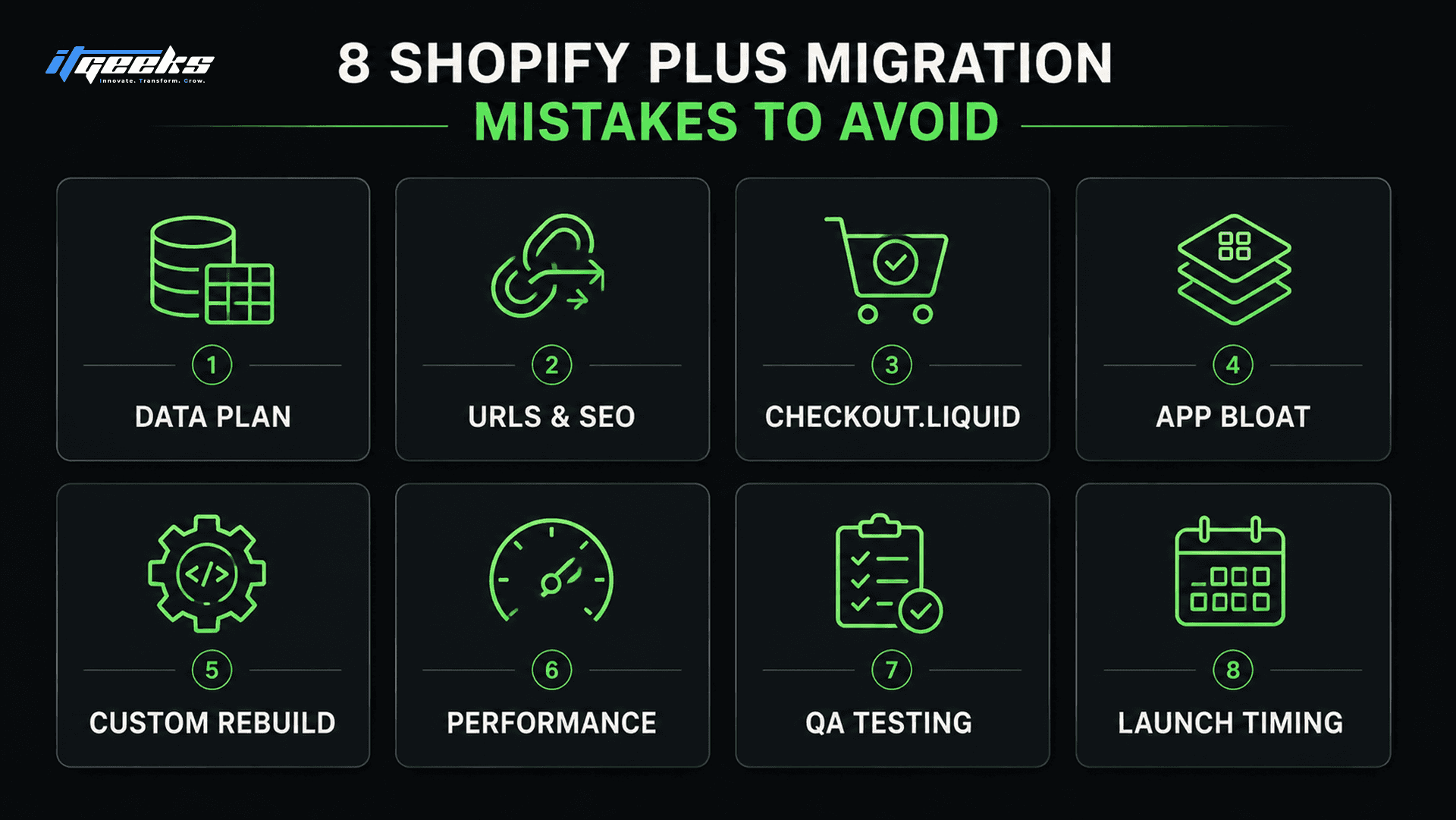
Mistake 1: Migrating without a complete data plan
The most expensive mistake is treating data migration as a simple export and import. Products, variants, customers, historical orders, metafields, tags, and reviews each live in different structures, and the receiving structure on Shopify is not identical to the one you are leaving. When teams skip the mapping step, they discover after launch that variant options collapsed, customer tags vanished, or order history did not come across.
Map every data type to its Shopify destination before you move anything, and decide explicitly what you are not migrating. Historical orders, for example, often cannot be imported natively and need a dedicated approach or a deliberate decision to archive them. A useful test: if you cannot point to where each field lands in Shopify on a spreadsheet, you are not ready to import.
Mistake 2: Breaking your URLs and losing SEO
Losing organic rankings is the migration mistake that hurts longest, because traffic you spent years earning disappears in a week. It happens when the new store uses different URL paths and nobody maps 301 redirects from the old URLs to the new ones. Shopify also forces certain URL prefixes such as /products/ and /collections/, so a one-to-one path match from another platform is rarely automatic.
Build a complete redirect map before launch, send every old URL to its closest new equivalent with a 301, and avoid redirect chains where one old URL hops through two or three others. Keep your title tags, meta descriptions, H1s, and image alt text intact so the new pages look the same to search engines. This deserves its own workstream, which we cover in our guide on maintaining SEO rankings during a Shopify Plus migration.
Mistake 3: Building on checkout.liquid instead of Checkout Extensibility
In 2026 this mistake is no longer optional to avoid, because checkout.liquid is gone for Shopify Plus. Shopify sunset checkout.liquid for Plus stores on August 28, 2025, and all checkout customization now runs through Checkout Extensibility using checkout UI extensions, branding APIs, and Shopify Functions. Teams that try to recreate an old checkout.liquid setup are rebuilding on a foundation that does not exist anymore.
There is a second deadline that catches stores mid-migration: Shopify Scripts stop working on June 30, 2026. Any discount logic, payment customization, or shipping rule you currently run through Scripts must be rebuilt as Shopify Functions during the migration, not after. Treating both changes as part of the migration scope, rather than a later cleanup, is what separates a clean cutover from a checkout that quietly breaks.
Mistake 4: Over-engineering with too many apps and scripts
A migration is the best chance you will ever get to remove app bloat, and most teams waste it by reinstalling everything. Each legacy app you carry over adds scripts to your storefront, slows your pages, and creates one more thing that can break at launch. Stores frequently arrive on Plus with twenty or more apps, half of which duplicate features Shopify now handles natively.
Audit every app before you migrate and ask whether the function is still needed, whether Shopify or Plus does it natively, and whether the app is worth its performance cost. A reviews app, a loyalty app, and a subscriptions app earn their place. Three different analytics apps doing the same job do not.
Mistake 5: Rebuilding custom functionality the wrong way
Teams often rebuild custom features the way they were built on the old platform, instead of the way Shopify wants them built. Forcing a Magento or WooCommerce pattern onto Shopify leads to fragile workarounds that fight the platform and break with every Shopify update. The right move is to rebuild the outcome using Shopify-native tools: metafields and metaobjects for custom content, Functions for custom logic, and the Storefront API or a headless build only when the requirement genuinely calls for it.
This matters most for complex stores coming off enterprise platforms, where custom logic is often the whole reason a migration feels risky. We see this constantly with brands moving from Salesforce Commerce Cloud, which we break down in our look at why top brands migrate from Salesforce Commerce Cloud to Shopify Plus. Rebuilt natively, those features become an asset. Ported as-is, they become technical debt on day one.
Mistake 6: Skipping performance work after launch
A migration that launches slow undoes much of the reason you moved. Teams celebrate the cutover, then leave heavy theme code, oversized images, and stacked third-party scripts in place, and Core Web Vitals suffer. Slow pages cost conversions and can drag the rankings you worked to protect in Mistake 2.
Budget a dedicated performance pass after launch: compress and properly size images, remove unused theme and app code, and measure Largest Contentful Paint and Interaction to Next Paint against real-user data rather than a single lab test. A store that loads in under two seconds on mobile keeps the momentum a migration is supposed to create.
Mistake 7: Launching without real QA
The launches that go wrong are almost always the ones that skipped structured testing on the things customers actually do. It is not enough to confirm the homepage looks right. Checkout across desktop and mobile, discount codes, payment methods, custom logic now running on Functions, and the full path from product page to order confirmation all need to be tested before the domain switches.
Run QA on a staging or development store with real test transactions, on more than one device and browser, before you point the domain at Shopify. Make a list of every revenue-critical flow, assign someone to test each one, and treat any failure as a launch blocker. A checkout bug found in staging is a task. The same bug found in production is lost revenue.
Mistake 8: Migrating at the wrong time with no rollback plan
Timing is the business-side mistake that turns a technical hiccup into a crisis. Launching a migration the week before Black Friday, during a major campaign, or right before a holiday peak means any problem lands when traffic and revenue are highest. Teams also launch without a rollback plan, so when something does go wrong there is no clean way back.
Schedule the cutover during a low-traffic window, keep the legacy store available for at least 30 days so you can compare and recover data if needed, and write down exactly who does what during launch. Avoid the four to six weeks around Black Friday and Cyber Monday entirely. A migration is infrastructure work, and infrastructure work does not belong in your busiest selling window.
How to protect your SEO during a Shopify Plus migration
Protecting SEO comes down to making the new store look identical to search engines while the URLs change underneath. The single most important task is a complete 301 redirect map, because a 301 tells Google the move is permanent and passes nearly all of a page’s ranking value to the new URL. Google’s own site move guidance treats redirect mapping and preserved content as the core of a safe migration.
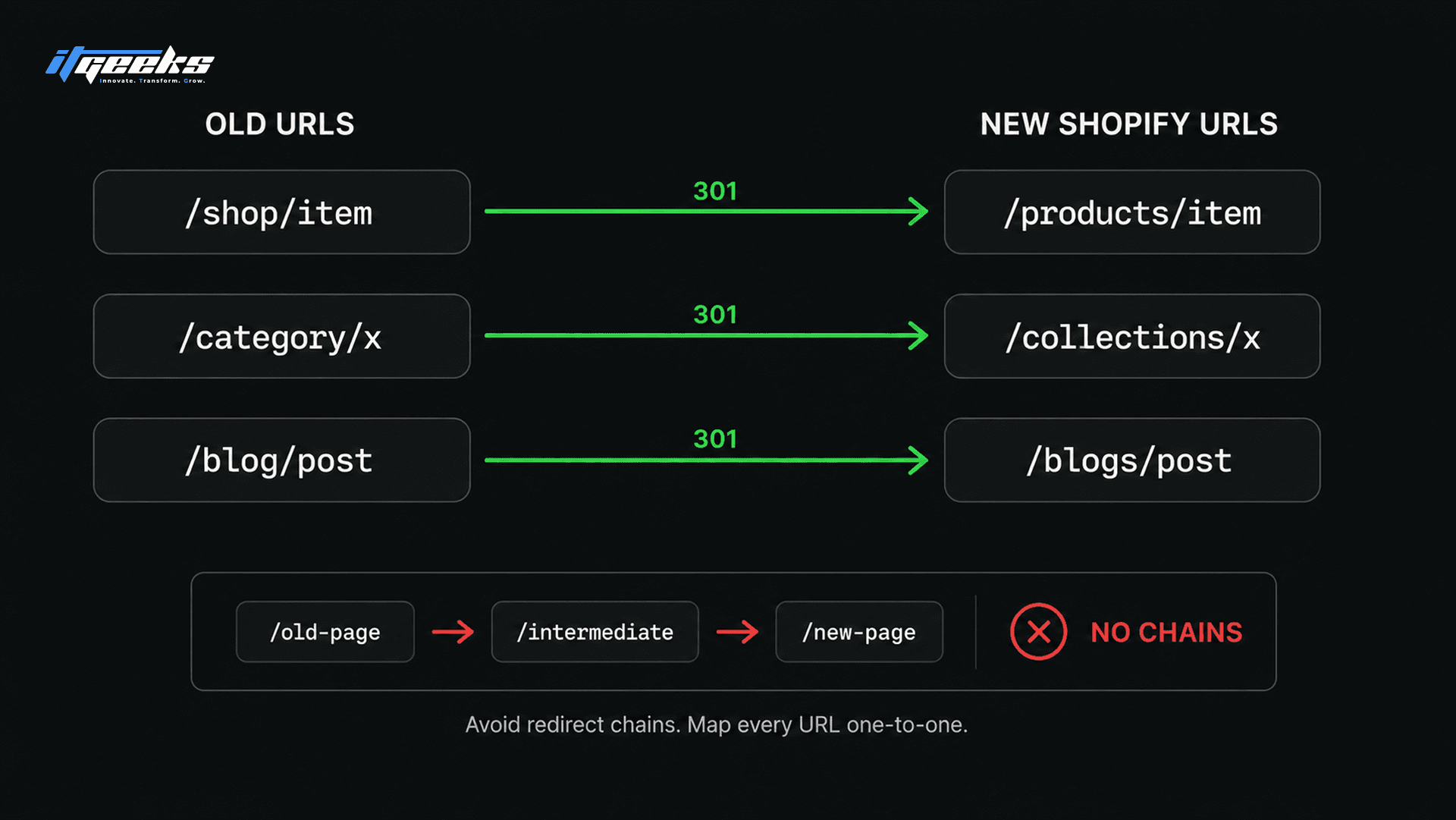
Work through SEO preservation in this order. Export every existing URL, including pages that only show up in your server logs, and prioritize your highest-traffic collections, products, and blog posts first. Map each old URL to its new Shopify equivalent with a direct 301 and no chains. Carry over title tags, meta descriptions, H1s, body content, and alt text exactly, then submit a fresh XML sitemap and monitor coverage and queries in Google Search Console for the first several weeks.
Two Shopify-specific details catch teams out. Shopify’s native URL redirect tool caps at 10,000 entries, so large catalogs need a bulk redirect approach planned in advance. And recovery is not instant: with clean redirects and preserved metadata, most sites see rankings wobble for a few weeks to a couple of months before settling, and some come back stronger. Expecting that dip prevents a panic-driven change three days after launch.
A realistic Shopify Plus migration timeline
A straightforward Shopify Plus migration takes about four to six weeks, while a complex enterprise build with custom functionality and integrations runs three to six months. The variance is almost entirely about custom features, data volume, and how many systems connect to the store. Here is how the phases break down.
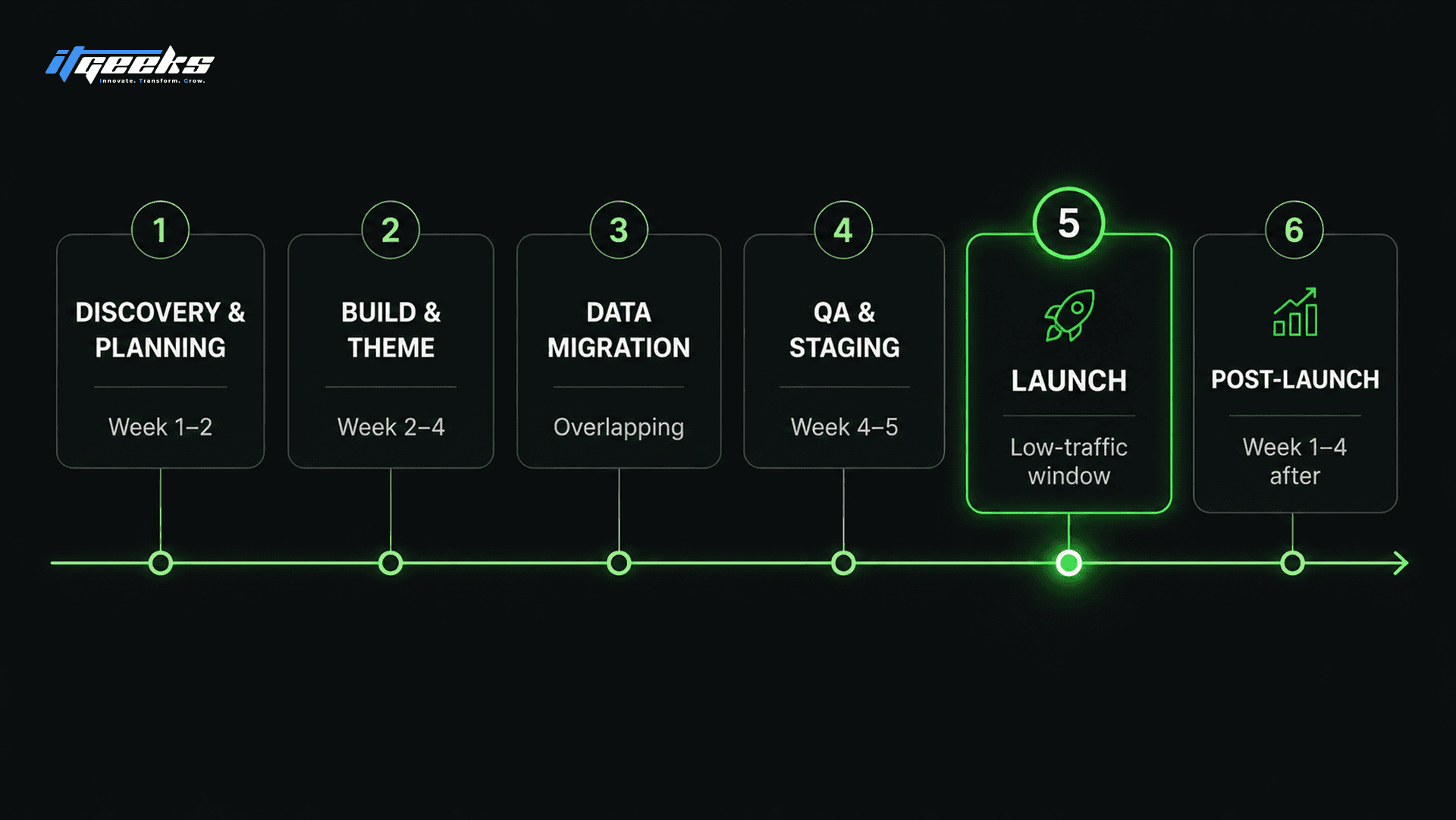
Discovery and planning (week 1 to 2):Audit the current store, map data, list every integration and custom feature, and build the redirect plan. Nothing gets built until this is done.
Build and theme (week 2 to 4):Set up the Plus store, build or adapt the theme, rebuild custom logic on Functions, and configure apps and integrations.
Data migration (overlapping):Move products, customers, and content into a staging store, then verify field by field against the map from phase one.
QA and staging (week 4 to 5):Test every revenue-critical flow on staging across devices, with real test transactions.
Launch (a single low-traffic window):Point the domain, activate redirects, submit the sitemap, and watch error logs and analytics in real time.
Post-launch (week 1 to 4 after):Run the performance pass, monitor Search Console, fix any redirect gaps, and keep the legacy store available for 30 days.
What a Shopify Plus migration actually costs
Budget for a Shopify Plus migration in four buckets, not one. The platform license is the visible cost, but the build, the apps, and the data work usually add up to more than the subscription in year one. Planning all four prevents the mid-project surprise that stalls so many migrations.
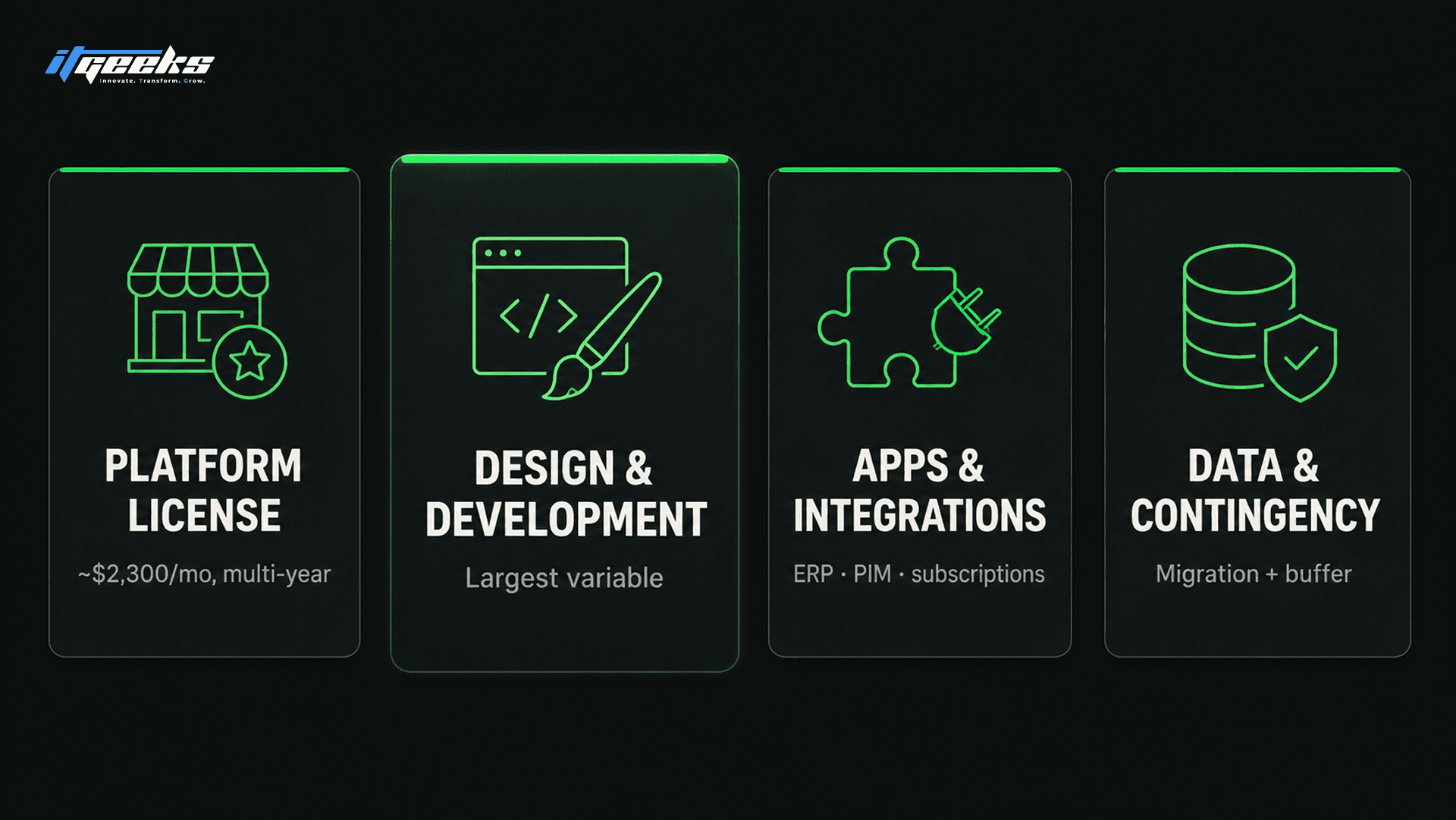
Platform license:Around $2,300 per month for Shopify Plus on a multi-year contract, with revenue-share pricing above roughly $800,000 in monthly sales.
Design and development:The largest variable, driven by how much custom functionality and theme work the store needs.
Apps and integrations:Recurring app subscriptions plus any custom integration work for your ERP, PIM, or other systems.
Data migration and contingency:The effort to move and verify data, plus a buffer for the fixes every migration surfaces.
As a rough guide, a brand doing about $1 million a year often spends well beyond the bare license once development, apps, and transaction fees are included. Pin down scope before signing anything, because the build is where budgets move, not the subscription.
What a successful migration looks like
A successful Shopify Plus migration is one where rankings hold, data arrives intact, and the store is faster than it was, with no revenue gap across the cutover. The work that makes that happen is unglamorous: the mapping, the redirects, the QA, and the timing all done before launch rather than patched after. You can see how we approach that work across real builds in the IT Geeks case studies, including migrations and Plus builds for brands such as Nani Swimwear, Capelli, and Cosori.
The pattern in every clean migration is the same. The risky steps were identified early, each one had an owner, and launch was a calm switch rather than a scramble. That is the difference between a migration that protects the business and one that becomes the thing the business has to recover from.
Your Shopify Plus migration checklist
Use this checklist as the backbone of your migration plan. It maps directly to the mistakes above, so working through it is how you avoid them.
[ ] Confirm Shopify Plus is the right fit for your revenue and requirements
[ ] Map every data type (products, variants, customers, orders, metafields, tags) to its Shopify destination
[ ] Decide what you will not migrate, including historical orders
[ ] Export all existing URLs and build a complete 301 redirect map with no chains
[ ] Preserve title tags, meta descriptions, H1s, and alt text on every page
[ ] Rebuild checkout on Checkout Extensibility and move Scripts logic to Shopify Functions
[ ] Audit apps and remove anything redundant or native to Shopify
[ ] Rebuild custom features the Shopify-native way, not the old-platform way
[ ] Test every revenue-critical flow on staging across devices and browsers
[ ] Schedule launch in a low-traffic window, away from Black Friday and Cyber Monday
[ ] Keep the legacy store live for at least 30 days and write a rollback plan
[ ] Submit a fresh sitemap and monitor Google Search Console after launch
[ ] Run a performance pass on images, theme code, and Core Web Vitals
Frequently asked questions
What are the most common mistakes when migrating to Shopify Plus?
The most common mistakes are migrating without a complete data map, failing to set up 301 redirects and losing SEO, rebuilding on the retired checkout.liquid instead of Checkout Extensibility, carrying over too many apps, and launching during a peak sales period. Most of these are planning failures rather than technical ones, which means they are preventable.
How long does a Shopify Plus migration take?
A straightforward Shopify Plus migration usually takes four to six weeks, while a complex build with heavy customization and integrations takes three to six months. The timeline depends mostly on how much custom functionality and data the store has, not on Shopify itself.
How much does a Shopify Plus migration cost?
Shopify Plus itself starts around $2,300 per month on a multi-year contract, but the migration project cost is driven by design and development, app subscriptions, and data work. A mid-sized brand should budget for the build and apps to exceed the license in the first year.
Will I lose my Google rankings when I migrate to Shopify Plus?
You will not lose rankings if you map 301 redirects from every old URL to its new one and preserve your on-page content and metadata. Expect a temporary fluctuation for a few weeks to a couple of months, after which clean migrations typically recover fully and sometimes improve.
Should you migrate to Shopify Plus, and when is it not worth it?
Migrate to Shopify Plus when you consistently clear about $80,000 per month in revenue and are hitting real limits on checkout, B2B, or international selling. It is not worth it if you are below that revenue and your current plan still handles your needs, because the added platform cost will outweigh the benefit.
What is the best way to migrate to Shopify Plus without downtime?
Build and fully test the new store on a staging environment, then switch the domain during a low-traffic window with redirects ready to activate immediately. Keeping the legacy store available for 30 days gives you a safety net if any data or flow needs to be recovered.
Planning your move
A Shopify Plus migration succeeds or fails on the planning that happens before launch, and every mistake in this guide is one you can design out in advance. If you would rather not carry that risk alone, IT Geeks is a Shopify Platinum Partner that handles the full migration, from data mapping and redirects to Checkout Extensibility and performance. Book a free consultation and we will walk through your store and what a safe migration would look like.

IT Geeks Team
Senior Brand Manager